

Apple has officially released the first developer beta of watchOS 27.3, bringing a fresh wave of system enhancements and long-awaited software features to its wearable lineup. This latest software release introduces two major Audio Intelligence tools—Siri Recap and Live Rewind—specifically designed for the Apple Watch Series 12 and Apple Watch Ultra 4. First teased during Apple’s annual hardware unveiling in September, these capabilities were slated to enter developer testing before the end of the year. With the distribution of watchOS 27.3 beta 1, software developers can now begin testing these tools in real-world environments.
The addition of Siri Recap and Live Rewind reflects Apple’s ongoing push to integrate localized artificial intelligence into wrist-worn devices. Powered by Apple Intelligence, these functions utilize on-device processing to assist users with ambient listening, short-term memory retrieval, and daily conversational organization. While both features rely on audio capture, Apple has embedded strict privacy measures into the operating system to address user data security and hardware isolation.
What Siri Recap Delivers in the watchOS 27.3 Beta
Siri Recap is engineered to serve as an automated, passive memory assistant that processes ambient conversations throughout the user’s day to generate structured, easily digestible summaries. When enabled, the underlying Apple Intelligence framework continuously evaluates incoming audio to produce key takeaways, highlighting core topics and assigning a descriptive title to each conversation segment.
Rather than overwhelming the user on the watch’s display, these generated summaries are synchronized directly to the paired iPhone, where they can be reviewed within the dedicated Siri application. The primary design goal behind Siri Recap is to allow users to stay fully present during meetings, casual discussions, or lectures without the distraction of manual note-taking, confident that key details can be referenced later.
It is important to note that Siri Recap does not function as an exhaustive, line-by-line audio transcription service. Instead, it generates high-level contextual overviews. To maintain a lean storage footprint and safeguard user data over time, any generated summary that is not manually saved or archived by the user is permanently deleted after seven days.
Furthermore, Apple has implemented strict content filters within the processing pipeline. Siri Recap is specifically trained to recognize and exclude sensitive personal information from its summaries. Financial details—such as credit card numbers, account balances, and banking terms—as well as official identification numbers and government IDs are automatically stripped out, ensuring that sensitive data is neither stored nor synthesized into summary text.
User management for Siri Recap is primarily handled through the Watch companion app on iOS, where users can establish custom execution schedules based on time of day or physical location. For instance, a user can configure Siri Recap to operate automatically during standard working hours or exclusively while at a designated office location. For ad-hoc control, watchOS 27.3 also integrates a dedicated toggle within the Apple Watch Control Center, allowing developers and early testers to manually enable, pause, or disable the feature at a moment’s notice.
Instant Context Recovery: The 15-Second Live Rewind Feature
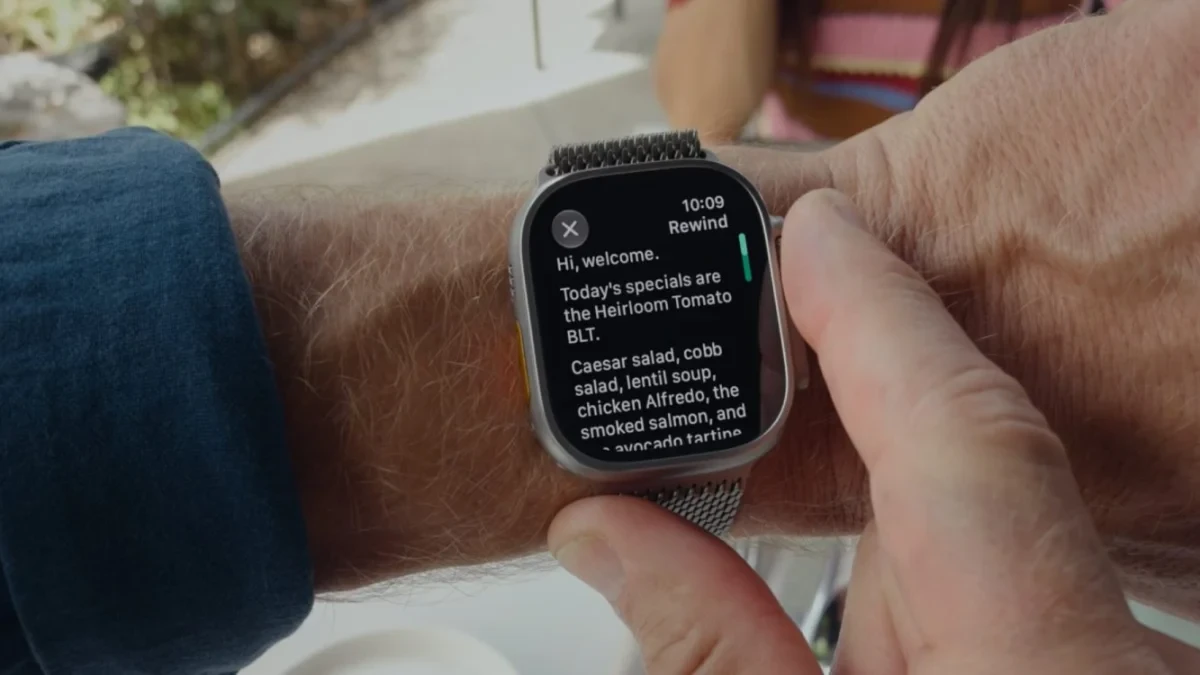
While Siri Recap addresses broad, day-long conversation tracking, Live Rewind focuses on immediate, short-term recall. Designed to solve the common issue of missed words or momentary lapses in attention during live discussions, Live Rewind allows users to instantly retrieve the last 15 seconds of spoken audio in written form.
Accessing the feature requires minimal physical interaction. By double-pressing the Digital Crown on an Apple Watch Series 12 or Apple Watch Ultra 4, the watch display immediately surface a text transcript representing the preceding 15-second window of audio. This enables users to quickly catch a missed term, clarify an unfamiliar phrase, or re-read a spoken instruction without interrupting the flow of conversation.

Beyond simple text display, Live Rewind incorporates interactive Siri functionality. Once the 15-second transcript is presented on screen, users can tap into Siri to ask follow-up questions regarding the captured text. For example, a user can ask Siri to define a technical term mentioned in the snippet or request additional clarification.
Additionally, users have the option to save the captured 15-second text block directly to the Siri application on their paired iPhone for future reference. This turn-key interaction positions Live Rewind not only as a quick visual safety net for ambient speech, but also as an efficient tool for quick, spontaneous note-taking during fast-paced verbal exchanges.
Built-In Privacy Safeguards and Hardware Architecture
Recognizing the potential privacy implications of ambient audio monitoring, Apple has constructed a multi-layered security framework around both Siri Recap and Live Rewind. Central to this framework is transparent operational feedback and hardware-isolated audio processing.
To ensure surrounding individuals are aware when active audio capturing features are invoked, Live Rewind triggers an audible chime from the Apple Watch speaker whenever the Digital Crown is double-pressed. This alert sounds regardless of whether the Apple Watch is set to Silent Mode or Do Not Disturb, preventing silent or covert use of the rewind mechanism.
Additionally, neither Siri Recap nor Live Rewind utilizes speaker diarization or voice identification technologies. The software does not attribute specific statements to particular individuals, nor does it create unique acoustic voiceprints for speakers participating in a conversation. Audio feeds are treated purely as raw input for summary or short-term text extraction without tagging who said what.
At the silicon level, processing security is managed by the S11 System in Package (SiP), which includes a dedicated hardware enclave known as the Secure Exclave. Apple describes the Secure Exclave as an isolated computational chamber that separates audio processing tasks from the primary operating system and general system memory.
When audio is analyzed for Siri Recap or Live Rewind, the processing occurs entirely within this secure hardware boundary. The raw audio data is processed locally, converted into text or structural summaries, and then immediately purged from memory. Raw audio files are never written to long-term storage, nor are they transmitted off the device.
To provide further clarity on the underlying architecture and data-handling protocols, Apple has published a comprehensive technical privacy whitepaper and dedicated support documentation alongside the watchOS 27.3 beta release. These documents outline the cryptographic boundaries and local processing workflows governing Audio Intelligence on the Apple Watch Series 12 and Apple Watch Ultra 4.
At present, watchOS 27.3 beta 1 remains limited to registered developers enrolled in Apple’s Developer Program. As testing progresses, Apple is expected to refine both Siri Recap and Live Rewind ahead of a wider public release, expanding access to all owners of supported hardware later in the software cycle.