

In an effort to reduce user friction and enhance digital security workflows, Google has introduced a highly practical update to its Gmail applications on mobile platforms. The tech giant is rolling out a dedicated two-factor authentication (2FA) code copying shortcut for both Android and iOS users. This newly integrated feature is designed to significantly accelerate the process of retrieving and applying one-time verification codes, minimizing the steps required to complete secure logins across various online services.
Two-factor authentication has become an essential pillar of modern cybersecurity, providing a crucial second layer of defense beyond traditional passwords. However, the manual steps required to retrieve these temporary security codes can often disrupt the user experience. By implementing a direct shortcut within the mobile interface, Gmail aims to make the authentication process smoother, faster, and more intuitive for millions of users worldwide.
A New Era for Verification: How the Quick-Copy Feature Works
Traditionally, retrieving a verification code sent via email has been a multi-step, cumbersome process on mobile devices. When a user triggered a 2FA request from a third-party app or website, they had to exit the target application, open the Gmail app, locate the newly arrived verification email, tap to open it, scroll through the message body to find the code, manually highlight the characters—often a frustrating task on smaller touchscreens—and select the copy option. Only after completing these steps could they switch back to the original application to paste the code and complete their login.
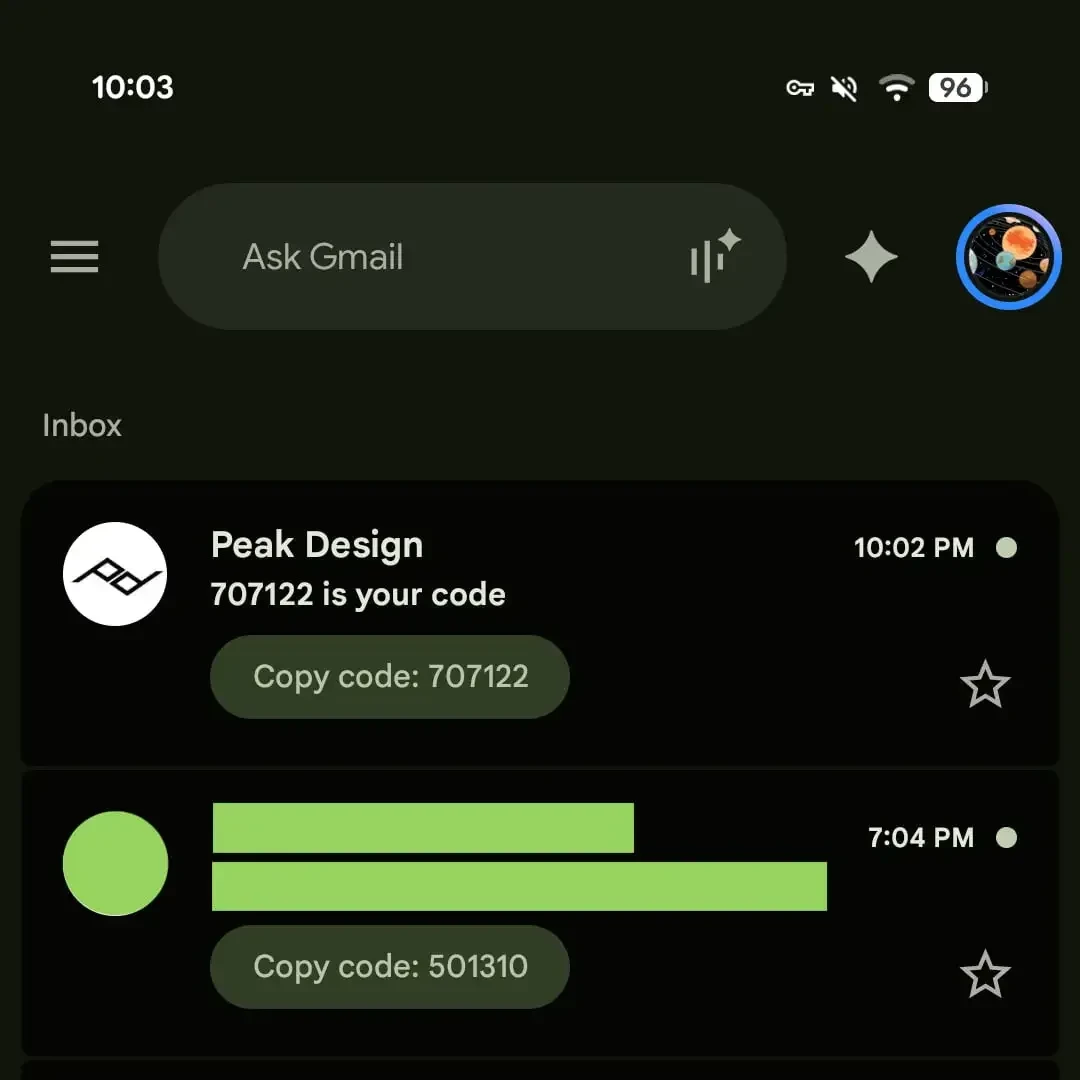
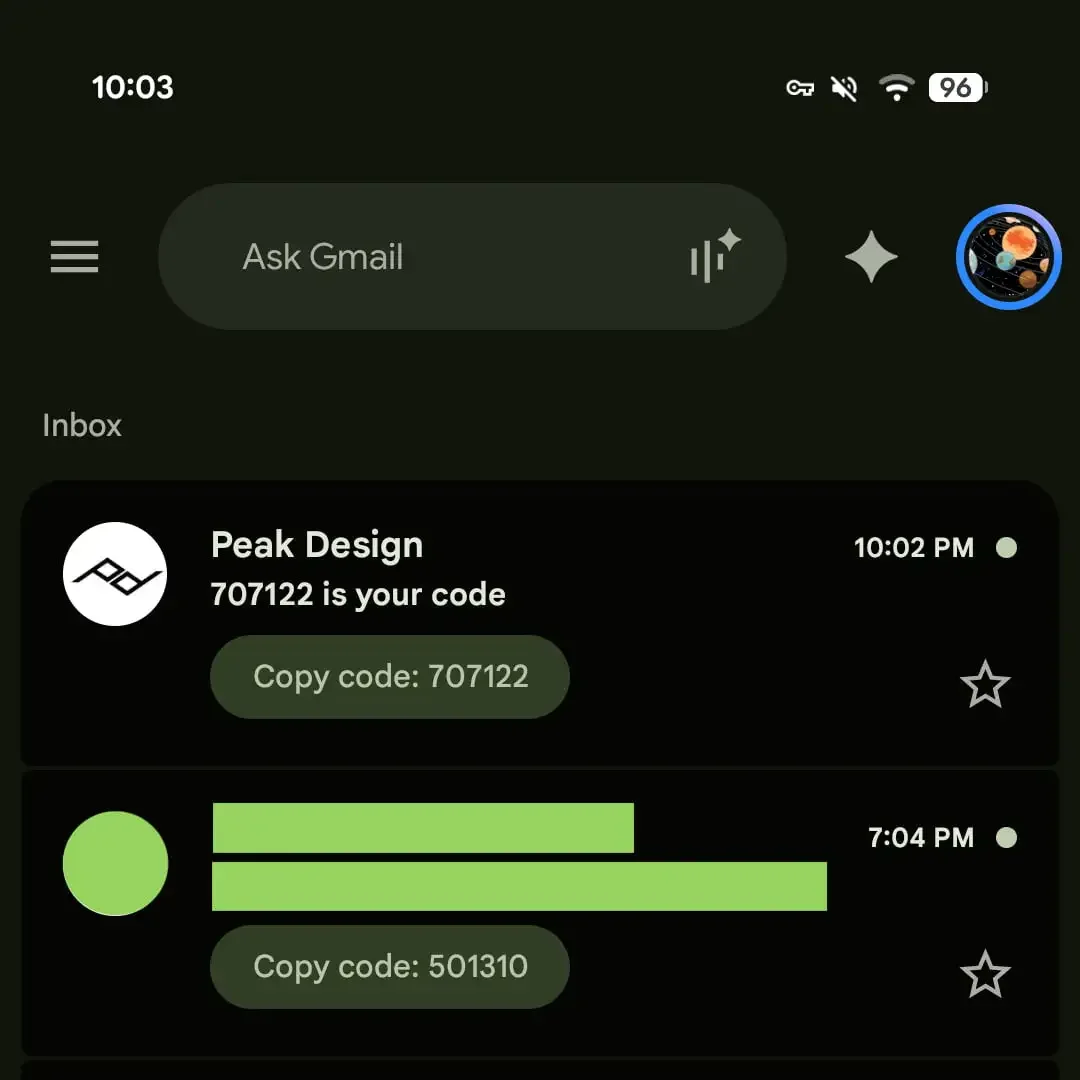
The latest Gmail update completely reimagines this user journey. With the introduction of the new shortcut, Gmail automatically detects incoming emails that contain temporary verification codes and extracts the relevant numeric or alphanumeric string. Instead of forcing users to open the message, Gmail now displays the code directly within the inbox list view.
A prominent, pill-shaped button labeled "Copy Code" appears immediately below the email’s subject line in the preview pane. This design closely mirrors the interactive chips Google currently uses for visual elements and document attachments, maintaining visual consistency across the application’s interface.
When a user taps this dedicated button, the verification code is instantly copied to the device’s system clipboard. A brief confirmation message confirms the action, allowing the user to immediately navigate back to their target application and paste the code. By eliminating the need to open the email and manually select text, this feature effectively bypasses the most time-consuming aspects of email-based 2FA, transforming a multi-step chore into a single-tap action.
This user experience enhancement is particularly beneficial for individuals who manage high volumes of daily correspondence or frequently log into secure systems. By stripping away unnecessary steps, Google has addressed a minor but persistent daily inconvenience, demonstrating how subtle design refinements can have a substantial cumulative impact on productivity.
Platform Support, Version Compatibility, and the Road Ahead
The rollout of this convenient shortcut is currently underway across the two major mobile operating systems. The feature has been identified in Android build version 2026.09.07.x and iOS build version 6.0.260907. Users running these specific versions or later will begin to see the "Copy Code" button appear on qualifying emails in their primary inboxes.
At present, this functionality is exclusively available on the mobile applications for Android and iOS. The web version of Gmail does not currently feature this quick-copy shortcut. This mobile-first deployment strategy is logical, given that mobile operating systems present unique multitasking challenges. While desktop users can easily manage multiple open windows side-by-side, mobile users must constantly switch between full-screen applications, making manual text copying significantly more tedious on phones and tablets.
Initial testing of the feature has demonstrated high reliability and accuracy. The automated parsing system successfully identifies and extracts verification codes from a wide range of transactional emails, including those sent by major banking institutions, financial services, e-commerce platforms, and social media networks. This indicates that Google’s algorithm is capable of recognizing diverse email templates and layouts to locate the high-entropy security codes hidden within them.
Looking forward, Google plans to expand this convenience even further. Industry observers note that the company is working on integrating this quick-copy functionality directly into system-level notifications. Once fully implemented, Android users will be able to copy 2FA codes directly from the incoming push notification banner at the top of their screens, without even needing to open the Gmail application. This would bring the email-based verification experience on par with the seamless autofill and copy options currently enjoyed by users receiving SMS-based verification codes.
Aligning Security with Modern Mobile Usability
The introduction of the quick-copy shortcut is part of a broader, ongoing effort by Google to modernize its Workspace ecosystem and keep pace with evolving user expectations. In recent months, Gmail has received several notable updates, including the integration of "Live" search capabilities, advanced chat features, and enhanced artificial intelligence utilities. These updates are designed to transform Gmail from a simple email repository into a highly interactive, centralized productivity hub.
In the competitive landscape of mobile email clients, usability is a primary differentiator. By continuously refining small interactions, Google not only retains its massive user base but also encourages safer digital habits. Security experts have long pointed out that the greatest barrier to the widespread adoption of robust security measures, such as multi-factor authentication, is user friction. If a security protocol is perceived as too slow or annoying, users are more likely to seek workarounds or disable it entirely where possible.
By reducing the friction associated with email-based 2FA to a single tap, Google is indirectly bolstering global user security. When authentication feels effortless, users are far more likely to embrace it across all of their online accounts.
Furthermore, this update reflects a broader industry trend toward context-aware mobile interfaces. Modern operating systems and applications are increasingly expected to anticipate user intent. By recognizing that an email from a bank containing a six-digit number is highly likely to be a temporary login code, Gmail shifts from being a passive reader to an active assistant.
As Google continues to roll out build updates globally, mobile users can expect to see the "Copy Code" button appear on their devices over the coming days and weeks. This minor yet highly impactful update stands as a prime example of how thoughtful, user-centric design can successfully bridge the gap between rigorous security and daily convenience.