

Google is testing a major functional overhaul for one of the most fundamental built-in tools in its web browser: the "Find in Page" search function. Activated by the familiar Ctrl + F keyboard shortcut on Windows or Cmd + F on macOS, the search bar is receiving two productivity enhancements designed to give users greater precision and speed when navigating text-dense web pages. The experimental updates include a dedicated "Match Case" toggle button for case-sensitive searching, as well as a novel set of navigation arrows engineered to skip past on-screen search results and jump directly to matches located outside the current viewport.
The upcoming features were first spotted in early developer builds of Chrome Canary by technology researcher Leopeva64, who shared screenshots and technical observations on X (formerly Twitter). According to the findings, Google is integrating these controls directly into the native floating search bar that appears at the top right corner of the browser window during a search query. While tech updates frequently highlight large-scale artificial intelligence integration, these subtle refinements to core browser utilities address long-standing friction points experienced by millions of users who rely on Chrome for daily reading, academic research, and technical work.
The "Find in Page" tool has remained largely unchanged for years, serving as a basic mechanism to locate specific strings of text across web articles, online documentation, forum threads, and digital files rendered in the browser. However, as web pages have grown increasingly long and content-dense, the traditional implementation of the tool has shown clear usability limitations. When searching through long-form articles, scientific papers, or legal documents, users often find themselves repeatedly clicking through identical matches concentrated in the same visible block of text or dealing with hundreds of irrelevant lowercase matches when looking for a specific capitalized acronym or brand name. The experimental features currently undergoing testing in Chrome Canary aim to streamline this experience by reducing unnecessary interactions and refining match criteria.
A Dedicated ‘Match Case’ Toggle for Precision Search
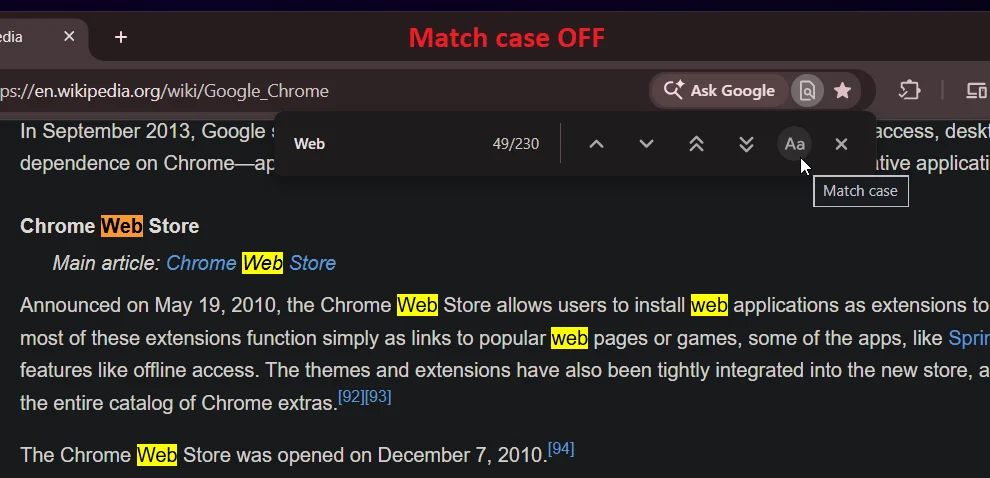
The first significant addition to the updated search interface is a dedicated "Match Case" toggle button. Historically, Chrome’s internal search mechanism has operated exclusively on a case-insensitive basis. When a user types a word into the search box, the browser automatically highlights every instance of that character sequence, completely ignoring whether individual letters are capitalized or written in lowercase. For general browsing, this approach ensures that users do not miss relevant text due to capitalization differences. However, for specialized tasks, case-insensitive searching often creates significant clutter and inefficiency.
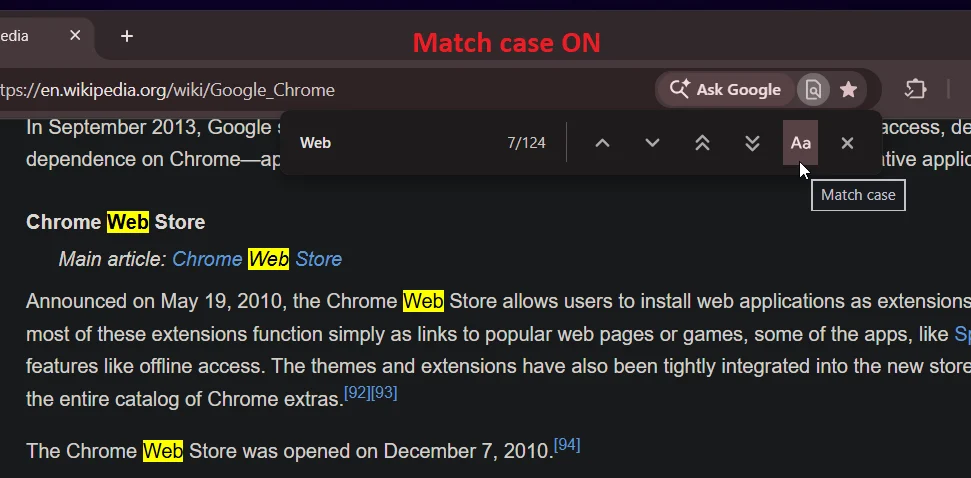
In many practical scenarios, case-insensitive searches yield far too many false positives. For example, a user searching for a capitalized acronym, a proper noun, or a specific brand name may be forced to wade through dozens or even hundreds of standard dictionary words that contain the same spelling in lowercase. Searching for technical terminology, legal terms, or specific code identifiers often results in a broad highlight mask that obscures the exact information the user is trying to find. To bypass this limitation in the past, users frequently had to install third-party browser extensions or resort to copying web page text into external text editors or word processing software that natively supported case-sensitive searching.
The introduction of the "Match Case" button directly into Chrome’s native Ctrl + F search bar eliminates the need for external tools or workarounds. When the button is toggled off, Chrome maintains its default behavior, highlighting every match regardless of letter case. However, when a user activates the "Match Case" button, the browser instantly filters the page highlights, restricting search results exclusively to text that mirrors the exact capitalization typed into the search box.
This precise filtering capability is particularly beneficial for professionals, students, and researchers who regularly handle specialized digital content. Whether looking up capitalized corporate titles, scientific notation, abbreviated organization names, or programming code within browser-based tools, the case-sensitivity toggle ensures that only exact structural matches are flagged. By reducing visual noise on the page, the feature allows users to navigate directly to relevant data points without the distraction of unrelated lowercase words.
Intelligent Arrows Designed to Jump Beyond the Visible Screen
Alongside the case-sensitivity toggle, Google is testing an equally impactful navigation feature designed to speed up movement across long web pages: a pair of secondary navigation arrows labeled "Previous Outside View" and "Next Outside View." These new controls sit alongside the standard directional arrows in the search bar, introducing a secondary layer of movement that specifically targets off-screen text matches.
To understand the utility of these new controls, it is necessary to examine how standard search navigation operates in modern web browsers. In the existing version of Chrome, clicking the "Next" arrow or pressing the "Enter" key cycles through every highlighted search result in strict sequential order. If a target keyword appears multiple times within a single paragraph or across several adjacent sentences currently visible on the user’s screen, the browser forces the user to step through each individual occurrence one by one. The screen view remains static until the selection cursor completes every match within the visible area and finally advances to a match located further down the page.
While sequential navigation makes sense when reviewing text sentence by sentence, it becomes an obstacle when a user wants to quickly scan across different sections of a lengthy document. On pages where a search term is repeated frequently, forcing a user to click through five, ten, or more visible instances within the same on-screen section creates unnecessary friction and delays overall page exploration.
The newly introduced "Outside View" navigation arrows address this design flaw by establishing a smart viewport boundary. When a user clicks the "Next Outside View" arrow, Chrome analyzes the area currently visible on the screen and automatically bypasses every search result currently in view. The browser immediately scrolls the viewport down to the very first matching result located below the visible screen area. Similarly, clicking the "Previous Outside View" arrow skips all on-screen matches in the opposite direction, jumping directly to the nearest result situated above the current visible area.
This intelligent skipping mechanism offers significant time savings for users reading dense technical manuals, long news reports, online encyclopedias, or extensive forum threads. Instead of performing dozens of repetitive clicks to move past a cluster of identical terms in a single section, users can jump from section to section with single clicks. When combined with the new "Match Case" toggle, the upgraded search bar provides a noticeably cleaner and faster workflow, allowing users to isolate relevant information and navigate across large web pages with far greater control.
Anticipated Launch and Availability Across Desktop Platforms
At present, these search bar enhancements remain confined to Chrome Canary, the experimental desktop build that Google uses to test early-stage interface modifications, performance tweaks, and potential web features. Chrome Canary operates at the front end of Google’s multi-stage browser release pipeline, serving as a preview environment where developer features undergo active evaluation and visual refinement prior to broader distribution.
Google has not yet published an official timeline or formal announcement regarding when these new "Find in Page" tools will be integrated into the stable channel of Chrome for Windows, macOS, Linux, and ChromeOS. However, early reports and visual analysis from testing builds indicate that the user interface elements for both the "Match Case" toggle and the "Outside View" navigation arrows are already highly polished and functional within the experimental software.
In recent software update cycles, major web browser developers have allocated significant marketing focus toward generative artificial intelligence assistants, smart sidebars, and automated tab management systems. While these high-profile AI tools offer novel capabilities, basic utility features like "Find in Page" remain among the most frequently invoked functions in daily computing. Enhancements to core web utilities directly address everyday productivity, offering tangible workflow improvements for power users, researchers, and casual web surfers alike.
For users eager to test the new functionality immediately, the updated search controls can be accessed by downloading and running the latest desktop version of Chrome Canary. However, because Canary builds are intended primarily for testing and development purposes, they can occasionally exhibit instability. Most general users will likely prefer to wait until Google completes its evaluation phase and rolls out these refined search controls to the standard, stable release of Google Chrome in upcoming browser updates.